> ## Documentation Index
> Fetch the complete documentation index at: https://docs.gradingpal.com/llms.txt
> Use this file to discover all available pages before exploring further.
# Assignment Settings
> Configure submission behavior and how students interact with their grades
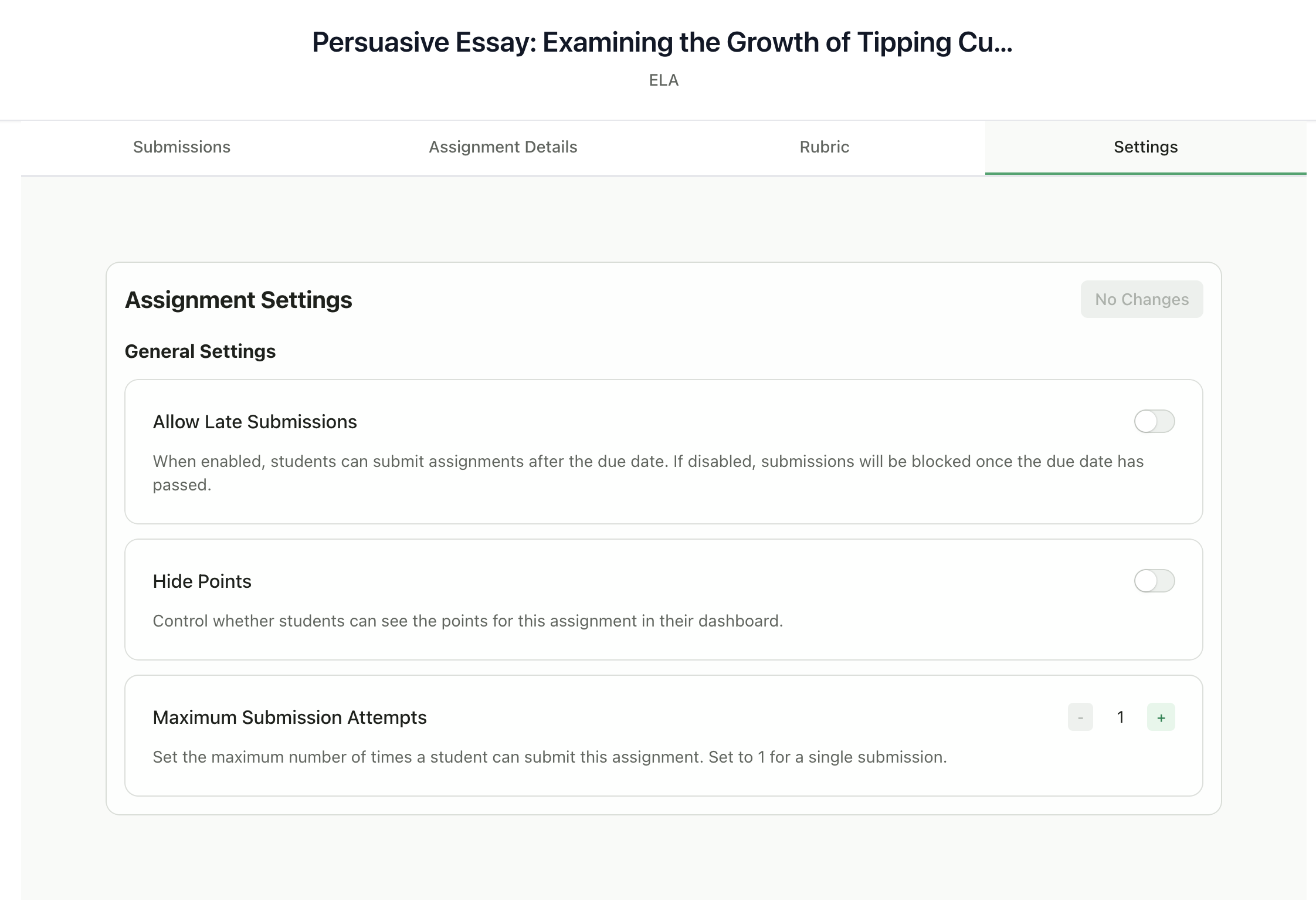
Each assignment has configurable settings that control submission behavior and how students interact with their grades.
***
## Accessing Assignment Settings
Go to your assignment page
Click the **Settings** tab
Configure your settings
Click **Save Changes**
 ***
## Available Settings
### Allow Late Submissions
Controls whether students can submit after the due date.
| Setting | Behavior |
| ------------ | ------------------------------------------------ |
| **Enabled** | Students can submit after the due date |
| **Disabled** | Submissions are blocked once the due date passes |
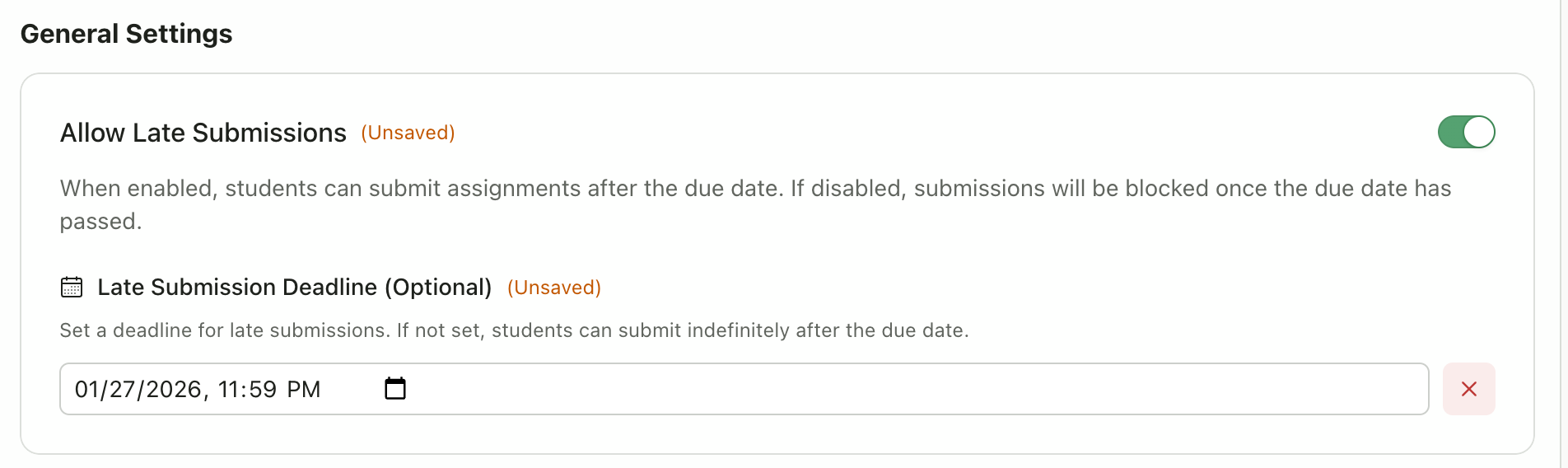
When enabled, you can also set an optional **Late Submission Deadline**:
* If set: Students can submit until this date, then submissions are blocked
* If not set: Students can submit indefinitely after the due date
***
## Available Settings
### Allow Late Submissions
Controls whether students can submit after the due date.
| Setting | Behavior |
| ------------ | ------------------------------------------------ |
| **Enabled** | Students can submit after the due date |
| **Disabled** | Submissions are blocked once the due date passes |
When enabled, you can also set an optional **Late Submission Deadline**:
* If set: Students can submit until this date, then submissions are blocked
* If not set: Students can submit indefinitely after the due date
 ### Hide Points
Controls whether students can see the numerical scores for this assignment.
| Setting | Behavior |
| ------------ | ----------------------------------------------------- |
| **Enabled** | Students see feedback but not point values |
| **Disabled** | Students see both feedback and point values (default) |
This is useful when you want students to focus on the feedback rather than the grade.
### Maximum Submission Attempts
Sets how many times a student can submit to this assignment.
| Setting | Behavior |
| ------- | ------------------------------------------- |
| **1** | Single submission only (default) |
| **2+** | Students can resubmit up to this many times |
**Use multiple attempts for:**
* Draft and revision workflows
* Allowing students to improve their work
* Practice assignments
***
## How Settings Affect Grading
| Setting | Impact on AI Grading |
| ---------------------- | ---------------------------------------------------------------------- |
| Allow Late Submissions | Late submissions are graded normally; AI doesn't penalize for lateness |
| Hide Points | Points are still calculated; just hidden from students |
| Max Attempts | Each submission is graded independently |
GradingPal does not automatically deduct points for late submissions. If you want to apply late penalties, you would adjust the grade manually after reviewing.
***
## Saving Settings
* Changes appear as "(Unsaved)" next to modified settings
* Click **Save Changes** to apply
* The button shows "No Changes" when everything is saved
***
## Default Settings
When you create a new assignment, default settings are:
| Setting | Default |
| ---------------------- | -------- |
| Allow Late Submissions | Disabled |
| Hide Points | Disabled |
| Max Attempts | 1 |
You can change these for each assignment as needed.
***
## Related Articles
* [Edit Assignment Details & Rubric](/teacher/assignment-management/edit-assignment-details-rubric)
* [Review AI Scores & Feedback](/teacher/grades-and-feedback/review-ai-scores-feedback)
* [Return Submissions & Feedback](/teacher/grades-and-feedback/return-submissions-feedback)
### Hide Points
Controls whether students can see the numerical scores for this assignment.
| Setting | Behavior |
| ------------ | ----------------------------------------------------- |
| **Enabled** | Students see feedback but not point values |
| **Disabled** | Students see both feedback and point values (default) |
This is useful when you want students to focus on the feedback rather than the grade.
### Maximum Submission Attempts
Sets how many times a student can submit to this assignment.
| Setting | Behavior |
| ------- | ------------------------------------------- |
| **1** | Single submission only (default) |
| **2+** | Students can resubmit up to this many times |
**Use multiple attempts for:**
* Draft and revision workflows
* Allowing students to improve their work
* Practice assignments
***
## How Settings Affect Grading
| Setting | Impact on AI Grading |
| ---------------------- | ---------------------------------------------------------------------- |
| Allow Late Submissions | Late submissions are graded normally; AI doesn't penalize for lateness |
| Hide Points | Points are still calculated; just hidden from students |
| Max Attempts | Each submission is graded independently |
GradingPal does not automatically deduct points for late submissions. If you want to apply late penalties, you would adjust the grade manually after reviewing.
***
## Saving Settings
* Changes appear as "(Unsaved)" next to modified settings
* Click **Save Changes** to apply
* The button shows "No Changes" when everything is saved
***
## Default Settings
When you create a new assignment, default settings are:
| Setting | Default |
| ---------------------- | -------- |
| Allow Late Submissions | Disabled |
| Hide Points | Disabled |
| Max Attempts | 1 |
You can change these for each assignment as needed.
***
## Related Articles
* [Edit Assignment Details & Rubric](/teacher/assignment-management/edit-assignment-details-rubric)
* [Review AI Scores & Feedback](/teacher/grades-and-feedback/review-ai-scores-feedback)
* [Return Submissions & Feedback](/teacher/grades-and-feedback/return-submissions-feedback)