> ## Documentation Index
> Fetch the complete documentation index at: https://docs.gradingpal.com/llms.txt
> Use this file to discover all available pages before exploring further.
# Select Assignment Type
> Choose the right assignment type for the work you're grading
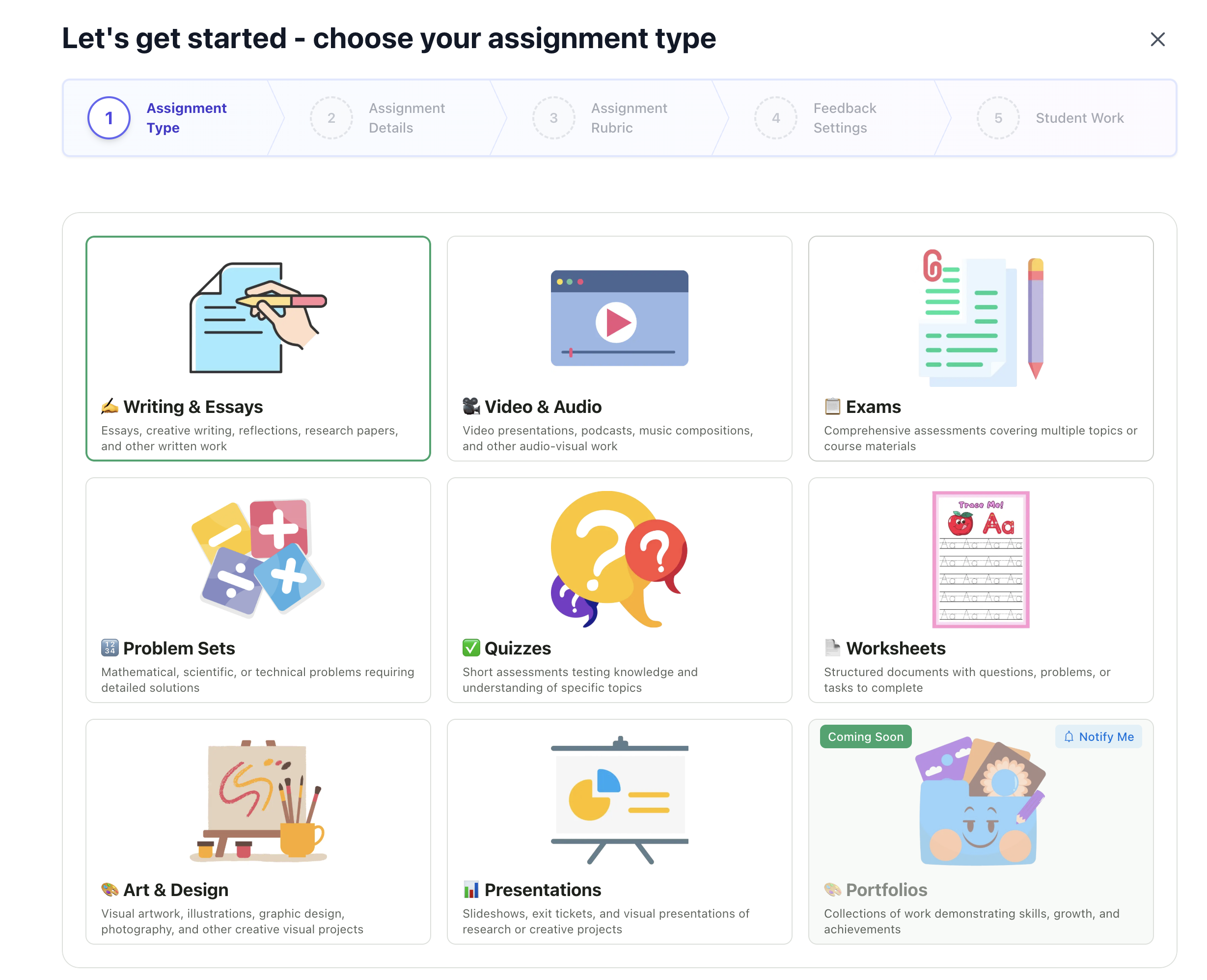
The first step in creating an assignment is choosing the type of work you're grading. This determines the setup flow and how GradingPal processes student submissions.
***
## Starting a New Assignment
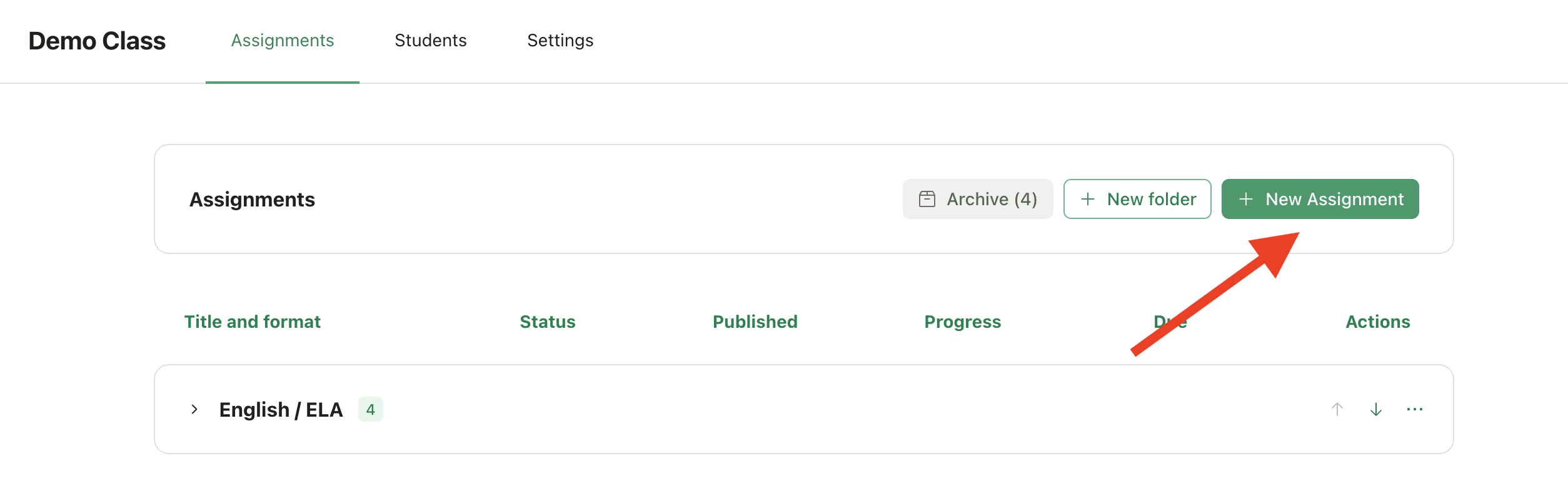
Open your class from the teacher dashboard
Click **New Assignment**
You'll see the assignment type selection screen
 ***
## Assignment Types
### Writing & Multi-Media
These types focus on open-ended, creative, or analytical work where students express ideas in their own way.
| Type | Best For | Examples |
| ----------------------- | ------------------------ | ------------------------------------------------------------------------------ |
| ✍️ **Writing & Essays** | Written work of any kind | Essays, research papers, reflections, creative writing, short answers, reports |
| 🎬 **Video & Audio** | Recorded submissions | Video presentations, podcasts, speeches, music compositions, oral exams |
| 📊 **Presentations** | Visual slide-based work | Slideshows, pitch decks, exit tickets, visual project presentations |
| 🎨 **Art & Design** | Creative visual work | Illustrations, graphic design, photography, digital art, posters |
**Setup flow:** Import an existing assignment or generate one with AI, then create a rubric and configure feedback settings.
Learn how to configure these assignment types
***
### Structured Assignments
These types have defined questions with specific answers. GradingPal uses AI to extract questions from your document and generate rubrics automatically.
| Type | Best For | Examples |
| ------------------- | ------------------------- | ------------------------------------------------------------------------- |
| 📋 **Exams** | Comprehensive assessments | Midterms, finals, unit tests, standardized test practice |
| 🔢 **Problem Sets** | Step-by-step solutions | Math homework, physics problems, chemistry calculations, coding exercises |
| ❓ **Quizzes** | Quick knowledge checks | Pop quizzes, reading checks, vocabulary tests, concept reviews |
| 📄 **Worksheets** | Structured practice | Fill-in-the-blank, labeling diagrams, matching exercises, guided practice |
**Supported question types:**
* Multiple choice and multiple select
* True/False
* Fill in the blank
* Matching
* Ordering/sequencing
* Short answer and extended response (essay)
* Numerical/calculation problems
* Mathematical proofs and derivations
* Code/programming questions
* Diagram-based questions
**Setup flow:** Upload your existing assignment as a PDF, and AI will extract questions and generate rubrics for each one.
Learn how to configure these assignment types
***
## Choosing the Right Type
| If students are... | Choose |
| ------------------------------------------- | ------------------- |
| Writing essays, reports, or creative pieces | ✍️ Writing & Essays |
| Recording videos or audio | 🎬 Video & Audio |
| Creating slideshows or visual presentations | 📊 Presentations |
| Making artwork, designs, or visual projects | 🎨 Art & Design |
| Answering questions on an exam | 📋 Exams |
| Solving math or science problems | 🔢 Problem Sets |
| Completing a short assessment | ❓ Quizzes |
| Filling out a structured document | 📄 Worksheets |
***
## Can I Change the Type Later?
Assignment type **cannot be changed** once you complete the setup wizard. If you selected the wrong type, you'll need to create a new assignment.
You can navigate back during the wizard setup process before clicking **Finish Setup**, but once the assignment is created, the type is locked.
***
## Pro Tips
### Writing is designed for single-task assignments
The **Writing & Essays** type works best for assignments with one main task (e.g., "Write an essay about...").
If your assignment has **multiple distinct questions or tasks**—even if they involve writing—consider using **Worksheets** or **Quizzes** instead. These structured types let you configure different question types (short answer, extended response, etc.) and grade each question separately.
**Example:**
| Assignment | Recommended Type |
| ------------------------------------------------------ | ---------------------- |
| Single essay prompt | ✍️ Writing & Essays |
| Reading comprehension with 5 short-answer questions | 📄 Worksheet or ❓ Quiz |
| Test with a mix of multiple choice and essay questions | 📋 Exam |
### Choose Structured for answer-key grading
If your assignment has specific correct answers (even partial credit scenarios), Structured Assignment types will give you more control. You can add answer keys and configure exactly how each question should be scored.
***
## Coming Soon
📁 **Portfolios** - Collections of work demonstrating skills, growth, and achievements. Join the waitlist to be notified when this type becomes available.
***
## Assignment Types
### Writing & Multi-Media
These types focus on open-ended, creative, or analytical work where students express ideas in their own way.
| Type | Best For | Examples |
| ----------------------- | ------------------------ | ------------------------------------------------------------------------------ |
| ✍️ **Writing & Essays** | Written work of any kind | Essays, research papers, reflections, creative writing, short answers, reports |
| 🎬 **Video & Audio** | Recorded submissions | Video presentations, podcasts, speeches, music compositions, oral exams |
| 📊 **Presentations** | Visual slide-based work | Slideshows, pitch decks, exit tickets, visual project presentations |
| 🎨 **Art & Design** | Creative visual work | Illustrations, graphic design, photography, digital art, posters |
**Setup flow:** Import an existing assignment or generate one with AI, then create a rubric and configure feedback settings.
Learn how to configure these assignment types
***
### Structured Assignments
These types have defined questions with specific answers. GradingPal uses AI to extract questions from your document and generate rubrics automatically.
| Type | Best For | Examples |
| ------------------- | ------------------------- | ------------------------------------------------------------------------- |
| 📋 **Exams** | Comprehensive assessments | Midterms, finals, unit tests, standardized test practice |
| 🔢 **Problem Sets** | Step-by-step solutions | Math homework, physics problems, chemistry calculations, coding exercises |
| ❓ **Quizzes** | Quick knowledge checks | Pop quizzes, reading checks, vocabulary tests, concept reviews |
| 📄 **Worksheets** | Structured practice | Fill-in-the-blank, labeling diagrams, matching exercises, guided practice |
**Supported question types:**
* Multiple choice and multiple select
* True/False
* Fill in the blank
* Matching
* Ordering/sequencing
* Short answer and extended response (essay)
* Numerical/calculation problems
* Mathematical proofs and derivations
* Code/programming questions
* Diagram-based questions
**Setup flow:** Upload your existing assignment as a PDF, and AI will extract questions and generate rubrics for each one.
Learn how to configure these assignment types
***
## Choosing the Right Type
| If students are... | Choose |
| ------------------------------------------- | ------------------- |
| Writing essays, reports, or creative pieces | ✍️ Writing & Essays |
| Recording videos or audio | 🎬 Video & Audio |
| Creating slideshows or visual presentations | 📊 Presentations |
| Making artwork, designs, or visual projects | 🎨 Art & Design |
| Answering questions on an exam | 📋 Exams |
| Solving math or science problems | 🔢 Problem Sets |
| Completing a short assessment | ❓ Quizzes |
| Filling out a structured document | 📄 Worksheets |
***
## Can I Change the Type Later?
Assignment type **cannot be changed** once you complete the setup wizard. If you selected the wrong type, you'll need to create a new assignment.
You can navigate back during the wizard setup process before clicking **Finish Setup**, but once the assignment is created, the type is locked.
***
## Pro Tips
### Writing is designed for single-task assignments
The **Writing & Essays** type works best for assignments with one main task (e.g., "Write an essay about...").
If your assignment has **multiple distinct questions or tasks**—even if they involve writing—consider using **Worksheets** or **Quizzes** instead. These structured types let you configure different question types (short answer, extended response, etc.) and grade each question separately.
**Example:**
| Assignment | Recommended Type |
| ------------------------------------------------------ | ---------------------- |
| Single essay prompt | ✍️ Writing & Essays |
| Reading comprehension with 5 short-answer questions | 📄 Worksheet or ❓ Quiz |
| Test with a mix of multiple choice and essay questions | 📋 Exam |
### Choose Structured for answer-key grading
If your assignment has specific correct answers (even partial credit scenarios), Structured Assignment types will give you more control. You can add answer keys and configure exactly how each question should be scored.
***
## Coming Soon
📁 **Portfolios** - Collections of work demonstrating skills, growth, and achievements. Join the waitlist to be notified when this type becomes available.
 ***
## Related Articles
* [Set Up Writing & Multi-Media Assignments](/teacher/grade-your-assignment/setup-writing-multimedia-assignments)
* [Set Up Structured Assignments](/teacher/grade-your-assignment/setup-structured-assignments)
* [Upload Student Work](/teacher/grade-your-assignment/upload-student-work)
* [Review AI Scores & Feedback](/teacher/grades-and-feedback/review-ai-scores-feedback)
***
## Related Articles
* [Set Up Writing & Multi-Media Assignments](/teacher/grade-your-assignment/setup-writing-multimedia-assignments)
* [Set Up Structured Assignments](/teacher/grade-your-assignment/setup-structured-assignments)
* [Upload Student Work](/teacher/grade-your-assignment/upload-student-work)
* [Review AI Scores & Feedback](/teacher/grades-and-feedback/review-ai-scores-feedback)